HIPAA compliance software for small medical and dental practices
What the HIPAA Security Rule asks of a small practice, what HIPAA compliance software should do, and a checklist to compare tools before you buy.
The Hardenwell GRC team
· 7 min read · Updated
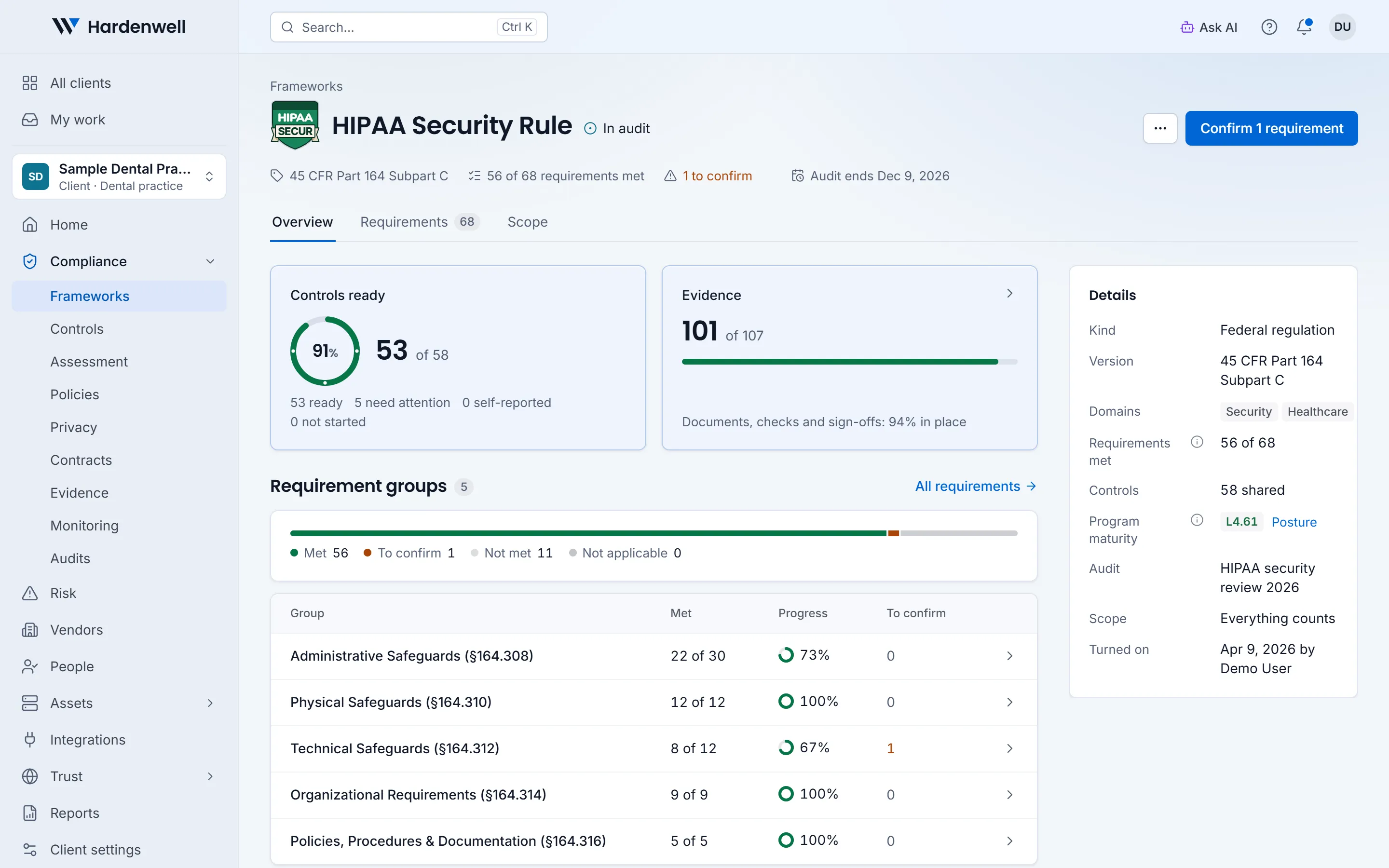
Key takeaways
- The HIPAA Security Rule asks every practice to analyze its risks, put safeguards in place and keep written proof.
- Good HIPAA software keeps the risk analysis, policies, training, business associates, an ePHI inventory and evidence in one place.
- Hardenwell GRC counts a HIPAA requirement as met only when current proof is in place, not because someone answered yes.
- It holds your security program, never patient records.
HIPAA compliance software helps a medical or dental practice do the work the HIPAA Security Rule asks for: a risk analysis, written policies, staff training, agreements with vendors and proof that the safeguards work. Good software keeps all of it in one place and shows what is missing. It can't make a practice compliant by itself, but it makes the work much smaller.
What does the HIPAA security rule ask of a small practice?
HIPAA compliance for small practices starts with the Security Rule, which protects electronic protected health information, or ePHI. It applies to every covered entity, from a hospital to a two-chair dental office. A small practice may choose measures that fit its size, its systems and its budget. It may not skip a standard.
The rule has three kinds of safeguards:
- Administrative safeguards. A risk analysis and a plan to manage the risks it finds, a named security official, workforce training, a sanction policy, a contingency plan, regular evaluations and agreements with business associates.
- Physical safeguards. Who can enter the office, how workstations are used and protected, and what happens to devices and media when they are reused or thrown away.
- Technical safeguards. Unique logins and access control, audit logs, protection against improper changes, checks of who is signing in, and protection of data sent over a network.
Some parts of the rule are "addressable". That doesn't mean optional. It means the practice decides whether the measure is reasonable for it, and writes down why when it chooses something else.
The rule also asks for written policies and procedures. You keep them for six years from the date they were created or last in effect, whichever is later.
What do the privacy and breach notification rules add?
The Privacy Rule covers how a practice uses and shares patient information in any form, including paper and speech. It includes the notice of privacy practices, patients' right to see their records and the minimum necessary standard.
The Breach Notification Rule says what to do when unsecured patient information is exposed. The practice tells affected patients without unreasonable delay, and no later than 60 days after it finds the breach. It also reports the breach to the Department of Health and Human Services, and to the media when more than 500 residents of a state are affected.
What should HIPAA compliance software do?
A spreadsheet and a binder can hold a risk analysis. The trouble starts in the second year. Policies go out of date, new staff miss their training, and nobody is sure which vendors signed an agreement. Good software keeps the program current. Use this checklist when you compare tools.
| HIPAA asks for | Software should | Hardenwell GRC |
|---|---|---|
| A risk analysis | Walk through real threats and record each decision | Yes45 threat scenarios fitted to the practice, with scores and decisions |
| Risk management | Track each fix with an owner and a date | YesOwners, due dates and a planner |
| A security official | Name the person in charge | YesNamed in the practice profile, and owner of its documents |
| Written policies | Give you templates, approvals and versions | YesOver 175 templates, sign-off by email and version history |
| Workforce training | Assign training and keep the records | YesA built-in HIPAA module with a quiz, or your own course |
| Business associate agreements | List vendors with patient information and their agreements | YesAgreement status for each vendor, plus business associate reviews |
| Access control | Check real settings, not just answers | Yes  Two-step sign-in, admin roles and stale accounts |
| Device protection | Check encryption on laptops and phones | YesEncryption and screen lock from device management tools |
| A contingency plan | Check backups and keep a written plan | Yes Backup results, plus a continuity plan template |
| Evaluation | Produce a dated report | YesSecurity Rule assessment and risk analysis reports in PDF or Word |
If you are also looking at large compliance automation platforms, see how we compare with them.
How Hardenwell GRC handles each part
Hardenwell GRC has the HIPAA Security, Privacy and Breach Notification rules built in, each mapped to one shared set of controls. A requirement counts as met only when the controls behind it have current proof: evidence on file, passing checks from connected tools or a named person's sign-off. A yes in an interview shows as self-reported until the proof is there.
The risk analysis
This is the part most practices mean when they look for HIPAA risk assessment software. Hardenwell GRC starts from 45 threat scenarios, such as ransomware, a stolen laptop that isn't encrypted, a fake sign-in page and a breach at a business associate. A few yes or no questions about the practice drop the scenarios that don't apply. A practice that takes no card payments on its own website, for example, doesn't see the risk of a skimmed payment page.
Each risk's likelihood follows how many of its safeguards are proven. You decide how to treat each risk, and accepting one needs a reason and a review date. The HIPAA Security Risk Analysis report then brings together the ePHI inventory, the threats, current safeguards, risk levels, a risk management plan and an attestation.
Where patient information lives
Hardenwell GRC builds an ePHI inventory from what it already knows: the EHR, email and backup systems in the practice profile, vendors that handle patient information, cloud services and data stores, and the devices staff use. Each row says how sure Hardenwell GRC is, whether a business associate agreement is signed, whether the data is encrypted and what is missing.
Business associates
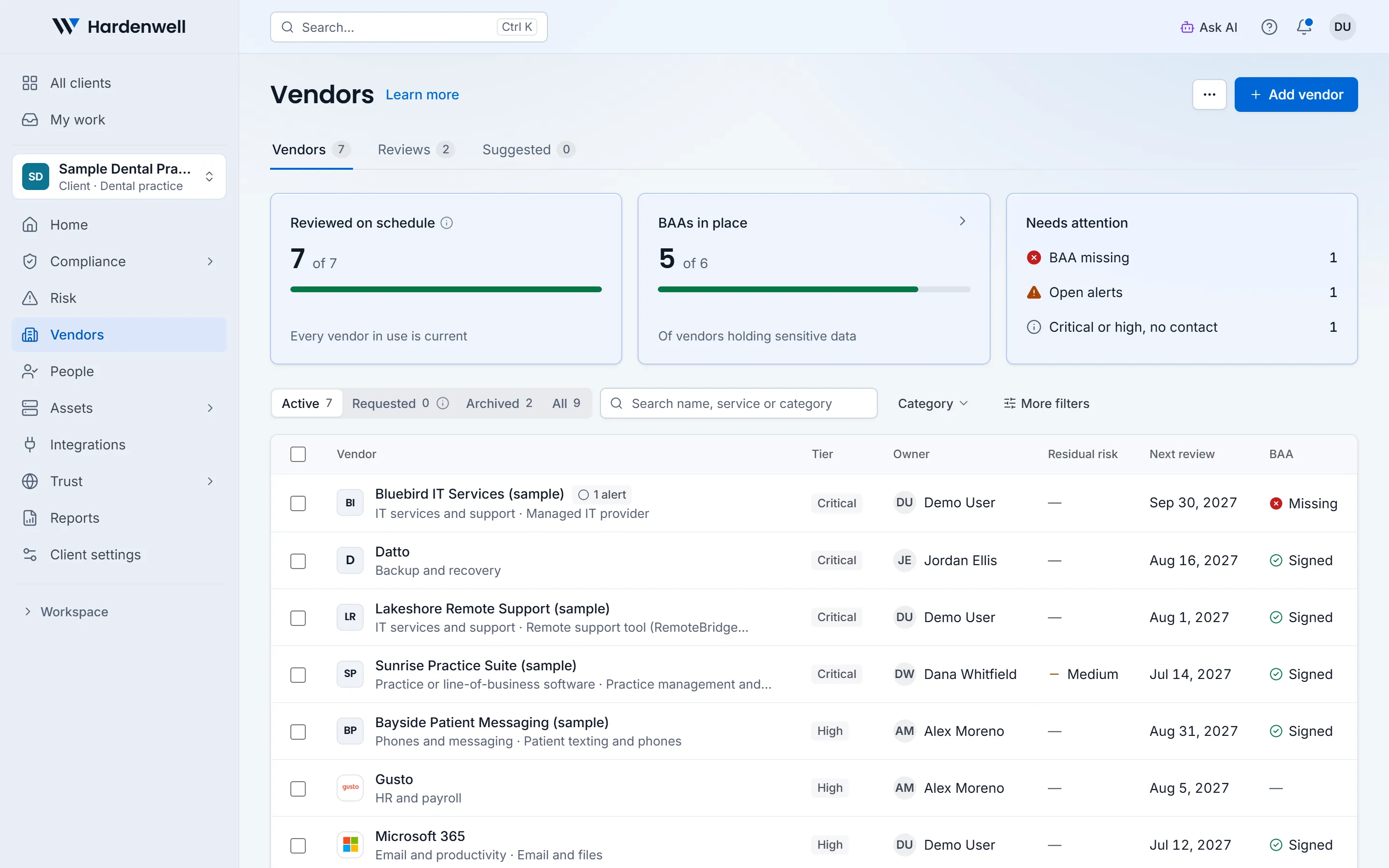
Every vendor that creates, receives, keeps or sends patient information for you needs a business associate agreement. The vendor list shows which agreements are signed and flags any vendor with sensitive data and no agreement. A business associate review sends the vendor a questionnaire through a private link. It asks about their safeguards, how fast they report a breach, their own subcontractors and what happens to the information when the contract ends.
Policies, sign-offs and training
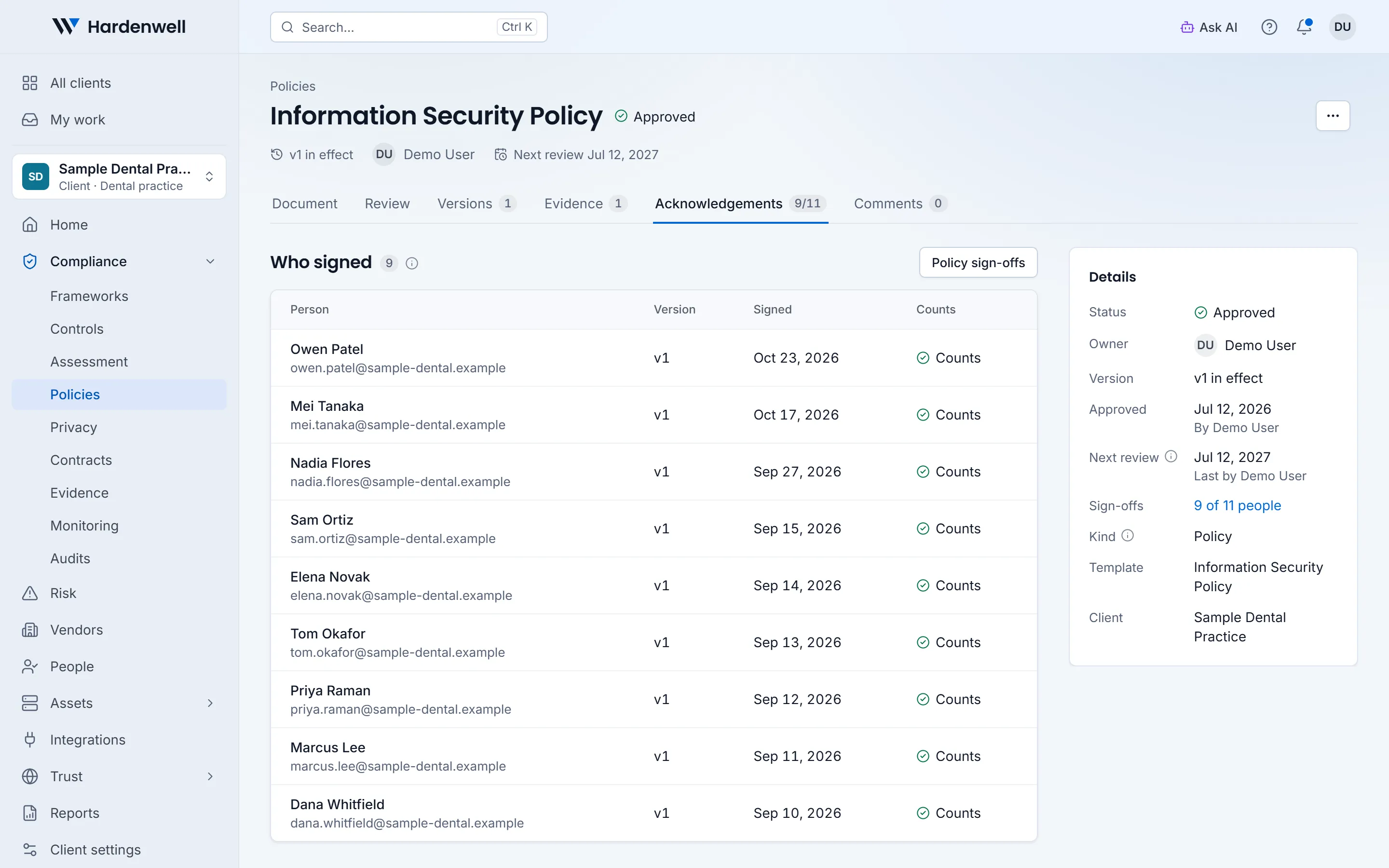
The policy templates include a sanction policy, a breach notification procedure, a notice of privacy practices, a patient right of access procedure and a business associate agreement. They fill in from the practice profile. A policy takes effect when the people you name approve it, and they can approve from an email link without an account.
Each staff member gets one private link to sign the policies in effect and complete their training, with reminders until it's done. The built-in HIPAA privacy and security module takes about 25 minutes and ends with a quiz. You can also record an outside course with proof of completion, or connect a training tool such as KnowBe4.
Proof from the tools you already use
- Microsoft 365
- Google Workspace
- Okta
- Duo
- Microsoft Defender for Endpoint
- CrowdStrike Falcon
- SentinelOne
- Huntress
- Sophos Central
- NinjaOne
- Datto BCDR
- Veeam
- Acronis Cyber Protect
- KnowBe4
- Bitwarden
- LastPass
- Cisco Meraki
- BambooHR
Hardenwell GRC connects to more than fifty tools, starting with Microsoft 365 and Google Workspace. The checks read settings, such as whether two-step sign-in is required, whether laptops are encrypted and whether recent backups succeeded. A passing check saves dated evidence for what it proves, so the proof stays current. Read more about automatic evidence from Microsoft 365 and Google Workspace. Many connections are marked beta until we have confirmed them on live accounts.
Note
HIPAA has no official certification for software or for practices. Hardenwell GRC helps you run the program and keep the proof.
Why Hardenwell GRC never holds patient records
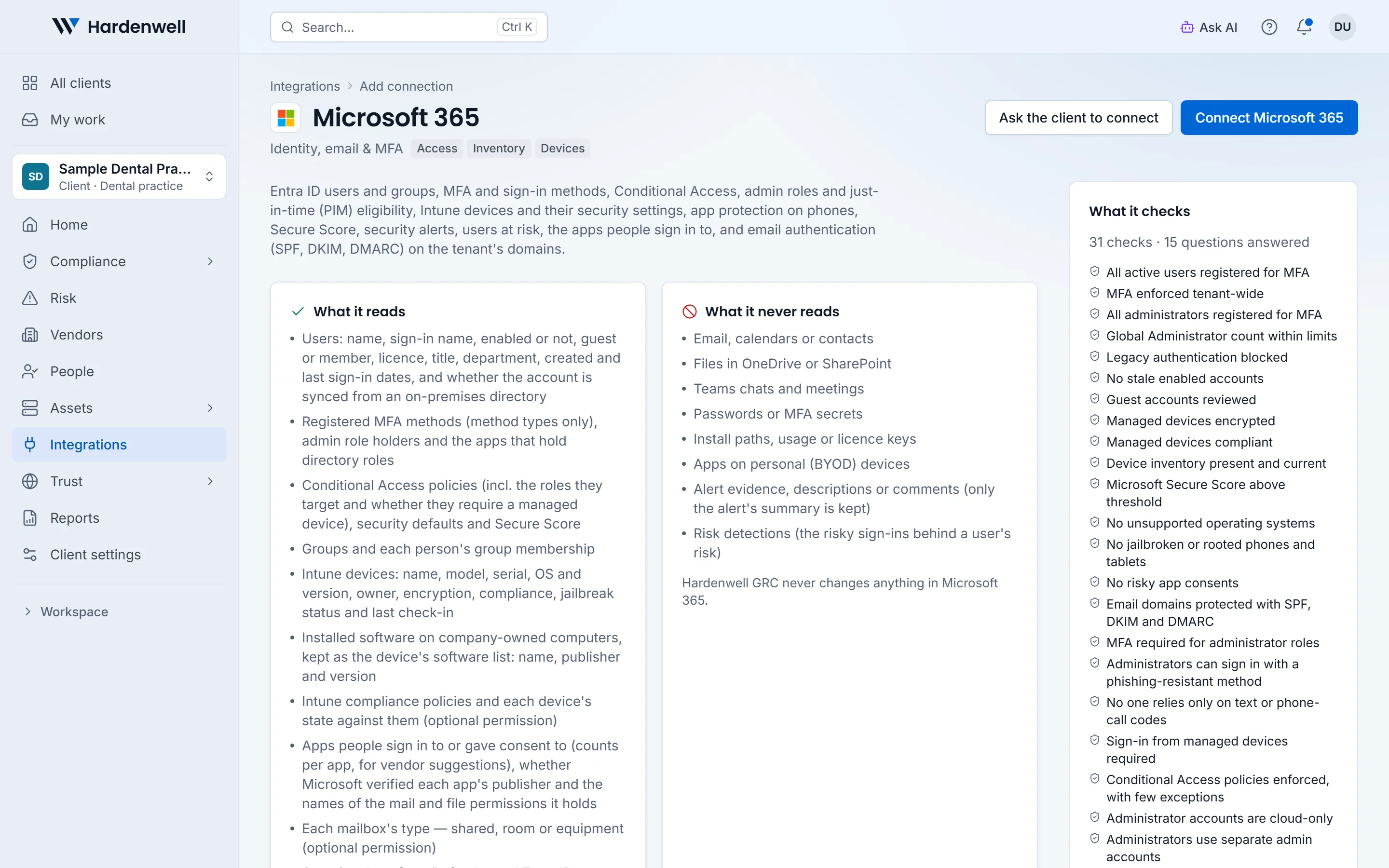
A HIPAA tool shouldn't become one more place that stores patient information. Hardenwell GRC holds your security program: policies, risks, checks, proof and the names of your staff. It isn't built to hold patient records, and its upload screens say so.
Connections read settings and account lists. They never read email or chat messages, and they never change anything in your systems. When AI reading is on, it flags documents that look like they contain patient information, and the assistant refuses to attach them. Read more in how we protect your data.
What it costs
A practice's price depends on its size and the frameworks it follows, such as the HIPAA Security, Privacy and Breach Notification rules. IT providers that look after several practices pay a fee for each practice they manage, and can run every client in one workspace. Answer a few short questions on our pricing page for an estimated range, or explore the demo for 14 days with no credit card.
Frequently asked questions
Can software make a practice compliant with HIPAA?
No. Compliance depends on what the practice does every day, such as training staff, fixing what the risk analysis finds and signing agreements with vendors. Software organizes that work and keeps the proof.
How often should a small practice update its risk analysis?
The rule doesn't set a fixed schedule, but it expects the analysis to stay accurate. Many practices review it once a year, and again after a big change such as a new EHR, a move or a security incident.
Does our IT provider need a business associate agreement?
Usually yes, when the provider can reach systems that hold patient information, for example through remote support. Hardenwell GRC lists the IT provider with your other vendors and flags it when it has no signed agreement.
Can we upload patient records to Hardenwell GRC?
No, please don't. Hardenwell GRC is built for your security program, not for patient care. Keep patient records in your EHR and other clinical systems.